
指南 and troubleshooting
First run after download
- Extract the ZIP archive to a folder you control, preferably on local disk rather than a synced folder that might lock the executable.
- Compare the published digest values with the binary on disk. If anything differs, stop and reacquire the package.
- Launch the executable from the extracted folder. Approve elevation prompts only if your policy expects them for this tool.
- Observe the detected default gateway. If it is empty or surprising, revisit physical cabling and VPN state before continuing.
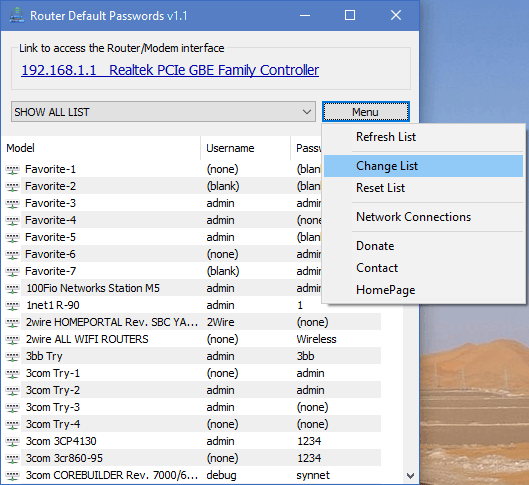
- Click the gateway link to open the administration page in your default browser.
- Select the hardware entry that matches the unit you intend to configure, then paste credentials carefully.
Confirm you are on the correct hop
Many homes place a cable modem in bridge mode behind a customer router. Corporate guest networks may isolate clients from the management VLAN. If the gateway IP belongs to a downstream access point, you might reach a limited UI that is not the true internet gateway.
Step by step discrimination
- Trace cables from the WAN port of the suspected router to the next upstream device.
- Compare the manufacturer sticker with the hostname or TLS certificate presented in the browser, when available.
- If multiple DHCP servers exist, disconnect secondary routers temporarily during troubleshooting to remove ambiguity.
Copy credentials with clean habits
Right click copying is fast, but password managers and ticket systems can accidentally retain clipboard history. Clear sensitive values from the clipboard after login when your tooling supports it, and avoid pasting admin passwords into chat applications.
Maintain the favorites list responsibly
Open the menu to add favorites or edit rows. Document why a row exists, especially when the password differs from the factory default because an ISP rebranded firmware.
Hardware reset only with authorization
If defaults fail, the next technical step is often a pinhole reset. That action disrupts service and may violate policy if you are not the owner. Obtain written or verbal authorization consistent with your workplace rules, capture a backup if configuration export is available, and warn stakeholders about downtime.
After reset
Expect factory WiFi names to return, VPN tunnels to drop, and custom firewall rules to disappear. Reapply security baselines before returning the network to production use.
Read ISP issued stickers carefully
Carrier issued gateways may print a WiFi passphrase, WEP key, WPA key, or security key wording on the housing. Those values are not always identical to the administrative password for advanced settings. When in doubt, consult the carrier documentation packaged with the install or ask the carrier support line while validating account ownership.
Antivirus warnings explained
Engines may classify uncommon portable executables as generic risk because prevalence data is thin. Treat detections as a workflow: confirm hash, scan with a second corporate approved engine, submit a false positive report when appropriate, and allowlist by digest if policy permits. Never disable protections broadly just to silence an alert.
Full session checklist
- Validate ticket or customer authorization.
- Launch Router Default Password and record the gateway IP in your ticket notes.
- Open the admin UI and confirm device identity.
- Authenticate using defaults only when still applicable.
- Apply patches, change admin password, document new secrets per policy.
- Verify user services before closing the ticket.
Best practices for long term hygiene
- •Rotate default SNMP strings, WiFi keys, and admin passwords during the same maintenance window when possible.
- •Disable remote administration unless you have a compensating control such as VPN only access.
- •Store configuration backups encrypted, with access logging.
- •Teach junior staff that default password knowledge is not consent to access.