Features built for router administration

How to use it :

  1. Download Router Default Passwords Utility, Extract the ZIP file then run the program
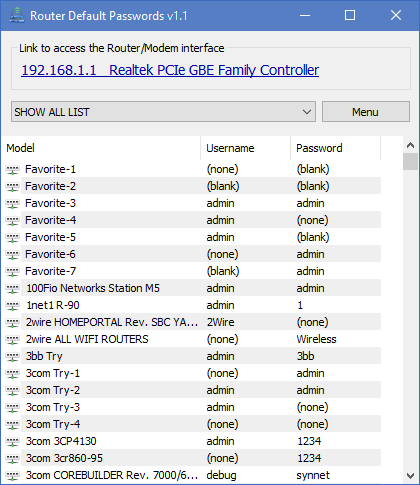
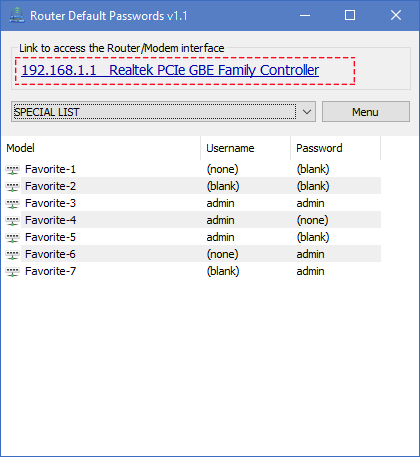
  2. Router Default Passwords v1.0 will find your Default Router IP Address Automatically and convert it to a clickable Link, just click the link to open your router's web-based setup page.
Main window showing gateway as clickable link
Router credential list with selection

3. Now you need a Username and Password , please Choose your router from the list to see its default username and password

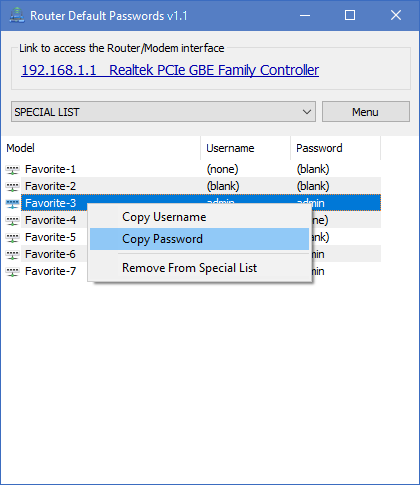
Right-click context menu with Copy Username and Copy Password

4. To copy any Default Router Username or/and Password from the List just right click on it

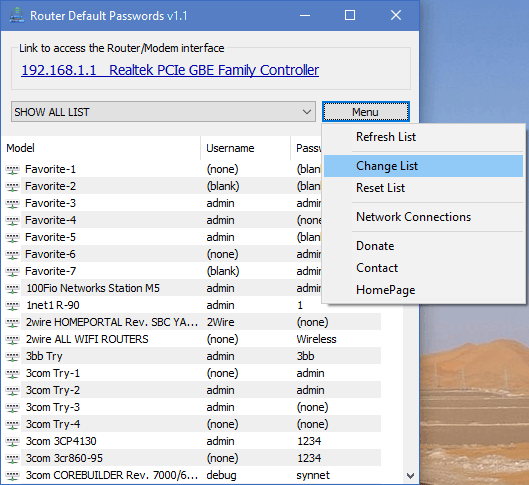
You can edit the List and add your own Favorite items, to do this use Menu Button

Editing the router credential list

Operator workflow and ergonomics

Compact UI

The window stays out of the way on small laptops while still exposing the gateway link and list together.

Predictable steps

Open utility, click gateway, choose hardware line, paste credentials, then harden settings. Repeatable training for new staff.

Field first layout

Designed for short sessions where you are standing at a rack or a desk with limited space.

Portable footprint

Extract the archive to a folder you control, then launch the executable. That model avoids installer friction on loaner machines and keeps upgrades simple: replace the folder when a new verified build is available.

  • • Carry the same folder on USB for bench work.
  • • Pair with your own read only media policy if your org requires it.
  • • Aligns with integrity verification because the binary is easy to hash in place.

Supported Windows releases

The utility targets common desktop Windows versions used in offices and labs. Validate on your exact build before relying on it in production change windows.

Language

English interface text keeps the surface area predictable for multinational teams that standardize documentation in English.

Integrity signals and distribution hygiene

Hash verification

Compare published digests with the file on disk after download. If the digest mismatches, discard the file and reacquire from your trusted channel.

Operational transparency

Document who approved the binary internally, where it is stored, and how updates propagate. That mirrors mature software supply chain practice.

Ready to deploy the utility?

Download