Portable Windows utility

Router Default Password

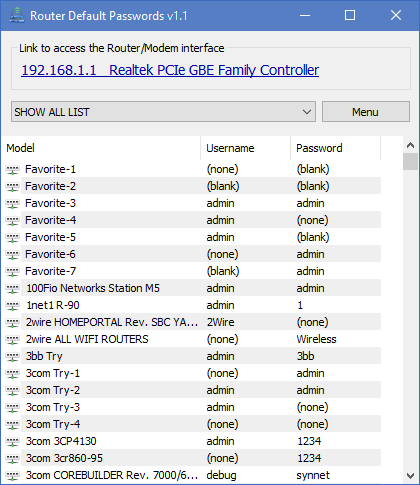
Find your default gateway, open the admin page with one click, and pull the right default username and password from a curated list you can personalize.

Built for honest home lab work, help desk triage, and small business visits where you need speed without guesswork.

Gateway focus

Copy friendly

Portable

Router Default Password hero visual

Overview

What is Router Default Password?

Router Default Password is a compact Windows program that helps you reach the router administration screen when you only have the machine in front of you. It reads your effective default gateway, turns it into a clickable link, and pairs that action with a searchable list of factory default credentials so you can move from “I see the login page” to “I have the right defaults” in a short sequence.

The list is not frozen. You can maintain favorites, adjust entries for the hardware you see most often, and keep the dataset aligned with the way you work. That makes it useful for repeat visits to the same hardware families without rebuilding notes in a separate document.
When teams reach for it

  • Staging a replacement router and validating factory defaults before applying a new policy.
  • Desk side support when a user changed the admin password and you still need baseline access paths documented.
  • Home lab documentation where you rotate gear frequently and want a repeatable checklist.

Real use cases

Developers and homelab builders

You cycle firmware, rebuild VLANs, and sometimes reset hardware to baseline. Router Default Password shortens the path from fresh reset to confirmed admin access so you can return to configuration work.

IT admins and MSP visits

On site you need a calm, repeatable flow. The gateway link reduces manual IP transcription errors, and the list keeps brand lines organized while you verify access ethically with the asset owner.

Power users at home

When a family member swaps ISP gear or you inherit a router with faded stickers, you still need the admin page. The utility keeps the basics in one window instead of scattered notes.

Comparison snapshot

Approach Strength Typical gap
Router Default Password utility Local list, editable favorites, gateway link, portable folder. You must still respect authorization and update defaults after access.
Printed OEM label only Highly specific to the exact unit when the label is intact. Labels wear off, stickers get swapped, and some admin values differ from WiFi keys.
Manual web search per model Can surface PDF manuals and community threads. Slower, inconsistent quality, and more room for transcription mistakes.
Spreadsheet you maintain yourself Full control over fields and customer context. Separate step to open the admin IP and another to find credentials.

Trust and transparency

  • Hashes Publish and verify the file you run.
  • Scope The program assists local administration workflows, not remote exploitation.
  • Policy Document ethics, responsibility, and legal usage expectations with your approvers.

Field note

If an ISP issued a combined modem router, the WiFi passphrase printed on the housing is not always the same as the admin password. Router Default Password focuses on the admin path first, then helps you line up defaults that match the vendor line in front of you.

Credential list view in Router Default Password

What people say

“Our bench techs keep the portable folder on a write protected stick. Gateway link plus list edits trimmed minutes off every intake.”
Bench lead, regional MSP
“I teach networking labs. Students finally stop fat fingering the gateway IP when they can click straight into the UI.”
Instructor, community college
“Favorites list mirrors the six brands we deploy. Copy on right click is small but saves a surprising amount of time.”
Senior systems engineer
“Portable layout means I do not fight corporate installers on a loaner laptop during a site survey.”
Network consultant

Short answers

Download